Prepared by: Meshaal Sulaiman Alrubaysh Law Firm & Legal Consultancy
Professional Profile: Meshaal Sulaiman Alrubaysh
Sources Last Checked:
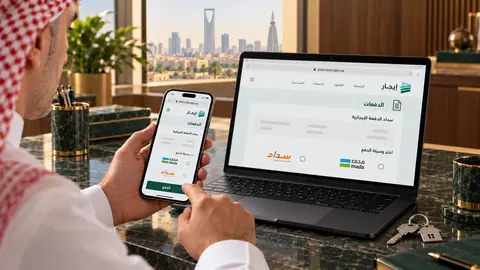
AI-generated illustrative scene. Platform interface shown for illustration.
A properly managed payment can be traced
You may pay rent on time and later find the instalment still marked as unpaid in the lease. Confusion arises when money is sent to an account outside the lease’s payment process, when rent is mixed with a deposit and service charges, or when a message confirming receipt is relied on without checking the payment record. Begin with this question: will this transaction be linked to the correct instalment in Ejar?
Managing payments is not solely the tenant’s task. The landlord also benefits from a clear record of amounts due, funds received and the balance outstanding, rather than an inaccurate demand that may aggravate the dispute.
When must rent be paid exclusively through Ejar?
The Real Estate General Authority announced that rent payments for new residential leases would be restricted to Ejar’s digital channels from 15/01/2024. It explained that the restriction does not cover commercial leases. Ejar’s frequently asked questions also state that the obligation does not apply to leases documented before that date, but to new residential leases.
If your residential lease falls within this obligation, use Ejar’s digital channels exclusively to pay its rent. At renewal or when entering into a replacement lease, check the lease type and its approved payment channel. A commercial lease or an earlier lease outside the restriction still needs proper documentation and payment records, but the exclusive-channel decision should not be extended to it without review.
Before and after payment
Begin by reviewing the documented lease and its instalment schedule. Ejar describes paying invoices through the financial menu, selecting the lease and making a payment. Officially described channels include mada, Apple Pay and SADAD using biller 153. Use the invoice details issued for your account. Knowing the biller number alone is no substitute for checking the lease and amount.
After a successful transaction, review the payment status and retain the notification and reference number. The authority explained that payments are reconciled automatically when Ejar’s digital channels are used, alongside the gradual discontinuation of receipts for new residential leases. According to the official information, funds may reach the landlord’s registered account within 5 working days. Distinguish successful payment on your side from the time the landlord receives the money.
- Match the parties’ identities, lease number and unit before approving payment.
- Check the intended instalment and due date, and review any amount already paid.
- Record rent separately from the deposit and service charges.
- If a problem appears, retain an image of the status and the transaction reference, and contact support through official channels.
Why is a transfer outside the process insufficient?
For leases covered by the restriction, the authority announced that evidence of rent payments outside Ejar’s digital channels would not be recognised. Do not replace the approved process with an oral request or an account sent by message, even where you have dealt with the person for some time.
If you have already paid outside the platform, do not destroy the receipt or assume that the issue is resolved, or that you must immediately pay the same amount again. Collect the transfer record, acknowledgement of receipt, correspondence and lease. Ask support to address the case and obtain a legal assessment. This protects your position against conflicting records. It does not guarantee that the transfer will be accepted instead of the mandatory channel or that the instalment will be updated automatically.
In a disagreement, turn the numbers into a clear file
Create one statement showing the due date, amount, transaction date, reference and status. If either party disputes a payment, the questions become specific: which amount, for which period, to whom, and how did it appear in the lease record? This precision helps correct an error or prepare a clear settlement or claim.
Do not allow an objection about maintenance or a lease term to leave instalments unresolved. Review the appropriate request for the dispute, record the objection and supporting documents, and take the appropriate legal step rather than relying on an incomplete understanding.
Frequently Asked Questions
Does the exclusive-channel decision cover commercial rents?
No, according to the official announcement and current frequently asked questions. Review the payment channel and terms of each commercial lease, and document what is paid.
I paid, but the instalment has not changed. Should I pay again?
Check that the transaction succeeded and verify its reference. Submit the issue to support with the documents before paying again. If a dispute or demand arises, obtain a legal assessment promptly.
We review leases and payment statements, help address discrepancies, and draft settlements and claims based on clear supporting documents.
Official Sources
General educational content, not a substitute for advice on your facts and documents, and not a guarantee of any outcome.
Translations refer to Saudi law, consult the official legal text when applying it.
Before signing, request a legal review to understand your obligations and protect your interests.
Request a legal review